
Android RASP: How Runtime Protection Works and Where It Breaks
Every Android app ships into an environment its developers do not control. Once it is on Google Play, the same APK runs on rooted phones, inside emulators, under instrumentation tools like Frida, behind intercepting proxies, and on devices that have been repackaged and re-signed. Secure coding and penetration testing reduce the bugs an attacker can find, but they cannot govern the conditions the app runs in after it leaves your build pipeline.
That gap is what Android RASP is built to close. This guide explains what RASP is, how it actually works on Android, what it detects, how attackers try to defeat it, and how to evaluate a solution without getting burned.
What is RASP on Android?
RASP stands for Runtime Application Self-Protection. Instead of relying only on defenses outside the app (a server-side check, a scanner in CI, an app store review), RASP puts the defense inside the application itself. The app continuously verifies its own integrity and its surroundings while it runs, and responds when something looks wrong.
Mobile RASP is the same idea applied to iOS and Android apps, where the threat model is very different from a web server. On a phone, the attacker often has full physical control of the device, root access, and unlimited time. The app cannot trust the operating system, the device, or the network.
A useful way to think about it: code hardening makes your app harder to read, while RASP makes your app aware of what is happening to it at runtime. The two are complementary, not interchangeable.
How Android RASP works under the hood
An Android app is a mix of managed code (Java or Kotlin running on the ART runtime) and native code (C and C++ compiled to .so libraries, reached through JNI). A serious Android RASP does most of its work in the native layer, for a simple reason: checks written in Java are trivially disabled by an attacker who can hook the ART runtime. Native checks are harder to find, harder to patch, and can watch the managed layer from below.
At a high level, an Android RASP typically:
- Initializes early, ideally before the app’s own native libraries finish loading, so it can observe the process from the start.
- Collects signals about the process, the device, loaded libraries, memory maps, signing certificate, and the runtime.
- Evaluates those signals against detection logic that is kept up to date as new attack techniques appear.
- Responds according to a policy you define: alert silently, degrade functionality, or terminate the session.
The response is the part teams underestimate. Good RASP does not just crash the app the moment it sees something. It gives you a tunable policy so that a legitimate user on an unusual but harmless device is not locked out, while a real attack is stopped.
The core detection categories in Android RASP
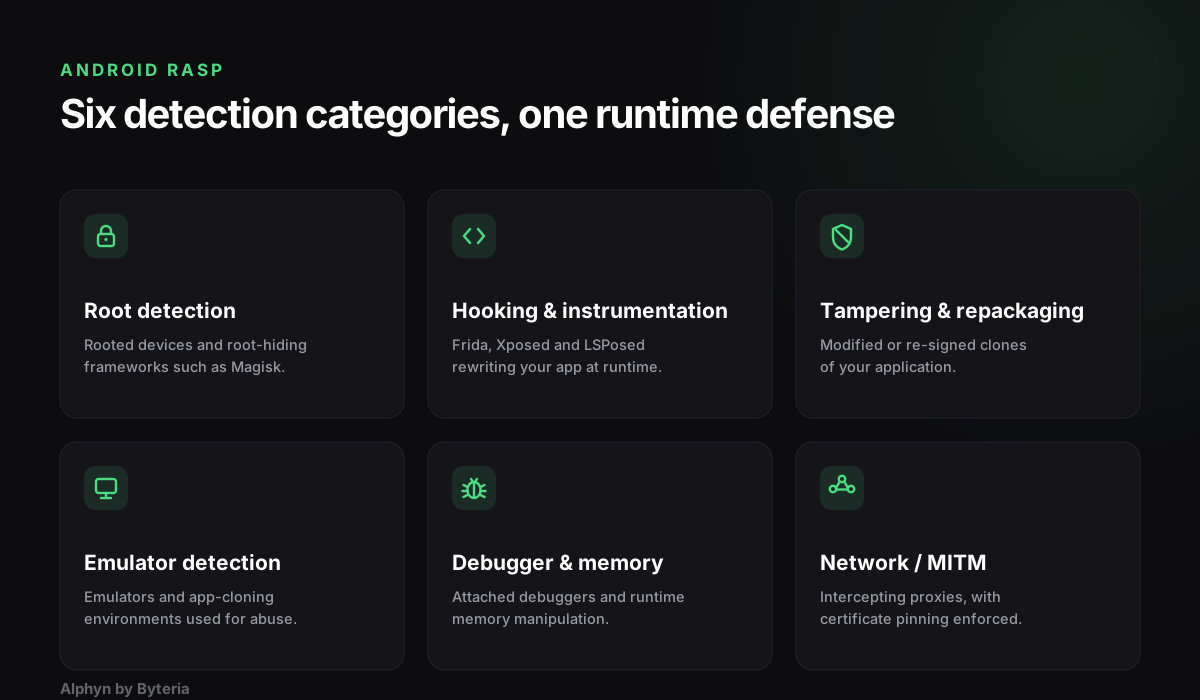
Most of what an Android RASP does falls into a handful of categories. When you compare products, compare them category by category rather than by feature-count marketing.
- Root detection. Identifies rooted devices and root-hiding frameworks such as Magisk. Rooted devices give an attacker the control needed for most other attacks.
- Hooking and instrumentation detection. Detects dynamic instrumentation tools such as Frida, Xposed, and LSPosed that rewrite your app’s behavior at runtime. This is the category where most RASP products are weakest, because it is a constant arms race.
- Tampering and repackaging detection. Verifies the app’s integrity and signing certificate so a modified or re-signed clone of your app refuses to run as the original.
- Emulator and virtual environment detection. Flags apps running inside emulators or app-cloning environments, which are common in automated abuse and fraud.
- Debugger and memory checks. Detects attached debuggers and protects against runtime memory inspection and manipulation.
- Network interception detection. Detects man-in-the-middle conditions and enforces certificate pinning so traffic cannot be silently intercepted with a proxy.
No single category is enough on its own. Root detection without hooking detection, for example, misses the attacker who never roots the device and simply attaches Frida.
How attackers bypass Android RASP
Understanding bypass techniques is the fastest way to judge whether a RASP is any good. If a product’s marketing never mentions how it holds up against active bypass attempts, treat that as a warning sign.
Common approaches attackers use:
- Frida and dynamic hooking. The attacker attaches Frida and hooks the exact functions that perform the detection, forcing them to always return “clean.” A weak RASP checks for Frida shallowly (a default port, a well-known string) and is defeated in minutes. A strong RASP spreads detection across many independent signals so that neutralizing one does not neutralize the rest.
- Root and root hiding. Frameworks like Magisk hide root from naive checks. RASP that relies on a static list of paths and packages ages badly.
- Static patching. The attacker unpacks the APK, patches out the detection in the native library, and re-signs it. This is why integrity and anti-tampering checks matter, and why they must themselves be resistant to being patched out.
- Old public bypasses. Detection that is updated on long release cycles ages quickly, so a bypass published in a conference talk or blog two years ago can still work today. Detection that is not continuously maintained is detection that is already broken.
The honest reality is that no RASP is unbreakable. The right question is not “can it be bypassed?” but “how much harder does it make the attack, and how quickly are new bypasses closed?”
Why Android RASP sometimes breaks your app
Here is the part most teams learn the hard way. Because RASP and hardening operate deep inside the app, interacting with the ART runtime, reflection, native initialization order, and your signing configuration, they can break perfectly healthy apps. A build that works flawlessly in QA can crash in production once protection is enabled, and the failure usually traces back to one of a few places:
- Reflection heavy libraries. Serialization and networking libraries that rely on reflection can break when class and field names change or when initialization order shifts.
- Native initialization order. If protection initializes before or after the app’s own native libraries at the wrong moment, JNI setup can miss critical steps and destabilize the process.
- Signing and packaging. An incorrect signing configuration can make a protected build crash on start, even though the same app runs fine unprotected.
- Dependency conflicts. A database SDK, a crash-reporting SDK, or a push-notification SDK can interact badly with protection and surface as random crashes on specific device or OS versions.
The takeaway is not “avoid RASP.” The takeaway is that integration quality and maintenance matter as much as the detection itself. A protection layer that crashes one percent of your users is not a security win, it is an availability incident. This is why the vendor’s ability to debug quickly, ship fixes continuously, and validate the integration against real bypass attempts is not a nice-to-have. It is the product.
How to evaluate an Android RASP
Use this as a short checklist when you compare options:
- Does it work in the native layer, or are the checks sitting in Java where they are easy to hook?
- How does it hold up against active bypass? Ask for a proof of concept where the vendor tries to defeat their own protection and documents the residual risk.
- How often is detection updated? Continuous updates beat a one or two year release cycle.
- How is the response policy tuned to avoid false positives for legitimate users?
- What is the integration and support story when one of your dependencies conflicts with the protection?
- Who maintains it? Working directly with the team that builds the engine means faster fixes than filing a ticket into a large vendor queue.
Frequently asked questions
Is Android RASP the same as code obfuscation? No. Obfuscation makes your code harder to read and reverse engineer. RASP makes your running app aware of attacks like hooking, rooting, and tampering, and lets it respond. They are complementary layers, and mature apps use both. Byteria offers both: Alphyn for runtime protection and UpShield for obfuscation.
Can Android RASP be bypassed? Any protection can be bypassed given enough effort. A good RASP raises the cost and time of an attack significantly and closes new bypasses quickly. The value is in the size of that gap and how fast it is maintained, not in a claim of being unbreakable.
Does RASP slow down or crash my app? A well-built RASP adds negligible overhead for legitimate users. Crashes almost always come from integration issues, conflicts with dependencies, or aggressive default policies. This is exactly why integration quality and a responsive vendor matter.
Do I still need RASP if I use an integrity API? Integrity APIs are a useful signal, but they are one input, not a full runtime defense, and they can be worked around. RASP gives you in-app detection and a response policy you control, and complements integrity APIs rather than replacing them.
Where Byteria fits
Byteria builds Alphyn, a production Android and iOS RASP that is developed and maintained in-house. Our team comes from offensive research: we build our own instrumentation tooling and reverse engineer modern app protections to understand exactly how they fail. That is not a marketing line, it is our method. We break protections for a living, which is exactly why our detection holds up, and every claim we make is verifiable in a proof of concept against your own app.
If you are evaluating Android RASP or Mobile RASP for your app, we are happy to run a hands-on PoC and show you the residual risk, not a slide. Reach us at [email protected].
